


How To Check Led Panel Light?
Aug 30, 2025
Leave a message
You can check an LED panel light by following a few practical steps. Always prioritize safety and use the correct tools for each task. Start with visual inspection, then move on to power supply checks, functional testing, and troubleshooting. Led flat panel lights offer energy efficiency and durability, making them ideal for frequent use. Visual comfort matters, so you should assess factors like color temperature and light uniformity. If you know how to test LED lights, you avoid unnecessary replacements and service calls. Understanding how to test led light empowers you to maintain comfortable, reliable lighting at home.
Key Takeaways
- Always turn off the power at the circuit breaker before inspecting flat panel ceiling light to prevent electrocution.
- Conduct a visual inspection to identify damage, loose connections, or burn marks that may indicate deeper issues.
- Use a multimeter to check voltage output and ensure your receives the correct power for optimal performance.
- Regular inspections and maintenance can extend the lifespan of your best led panel lights and improve energy efficiency.
- Consider swapping panels or testing with different switches to diagnose issues without needing professional tools.
Safety First
Before you check any LED panel light, you must prioritize safety. Electrical work, even at a basic level, can expose you to risks. Understanding why safety matters helps you avoid injuries and ensures a smooth inspection process.
Turn Off Power
You should always turn off the power at the circuit breaker before starting any inspection or repair. This step prevents accidental electrocution, which remains one of the most common hazards when working with lighting fixtures. Many accidents occur because people forget this simple precaution. Using a voltage tester to confirm the power is off adds another layer of protection. You protect yourself and your home by making this your first habit.
Tip: Never rely on just flipping the wall switch. Always check the breaker and use a tester for confirmation.
Use Proper Tools
Using the right tools ensures both your safety and the integrity of the LED panel light. Damaged or inappropriate tools can cause short circuits or even physical harm. You should inspect your tools for frayed cords or broken parts before use. Working in dry conditions also reduces the risk of electrical shock. Following the manufacturer's instructions for both the light and your tools helps prevent wiring mistakes, which can lead to dangerous situations.
- Risk of electrocution increases if you skip power checks.
- Incorrect wiring can create fire hazards.
- Damaged tools may fail during use.
- Wet conditions make electrical work much more dangerous.
Personal Protection
Personal protective equipment (PPE) adds an essential layer of defense. You should wear insulating gloves to protect your hands from electrical hazards. An apron shields your clothing and skin from debris or accidental spills. The table below outlines recommended PPE for led panel lamp inspections:
|
Personal Protective Equipment |
Description |
|---|---|
|
Insulating Gloves |
Protects hands from electrical hazards during inspections. |
|
Aprons |
Provides an additional layer of protection against potential spills or debris. |
By following these safety steps, you reduce the risk of injury and ensure a successful LED panel light inspection. Safety-first thinking not only protects you but also extends the life of your lighting system.
Test LED Lights by Visual Inspection
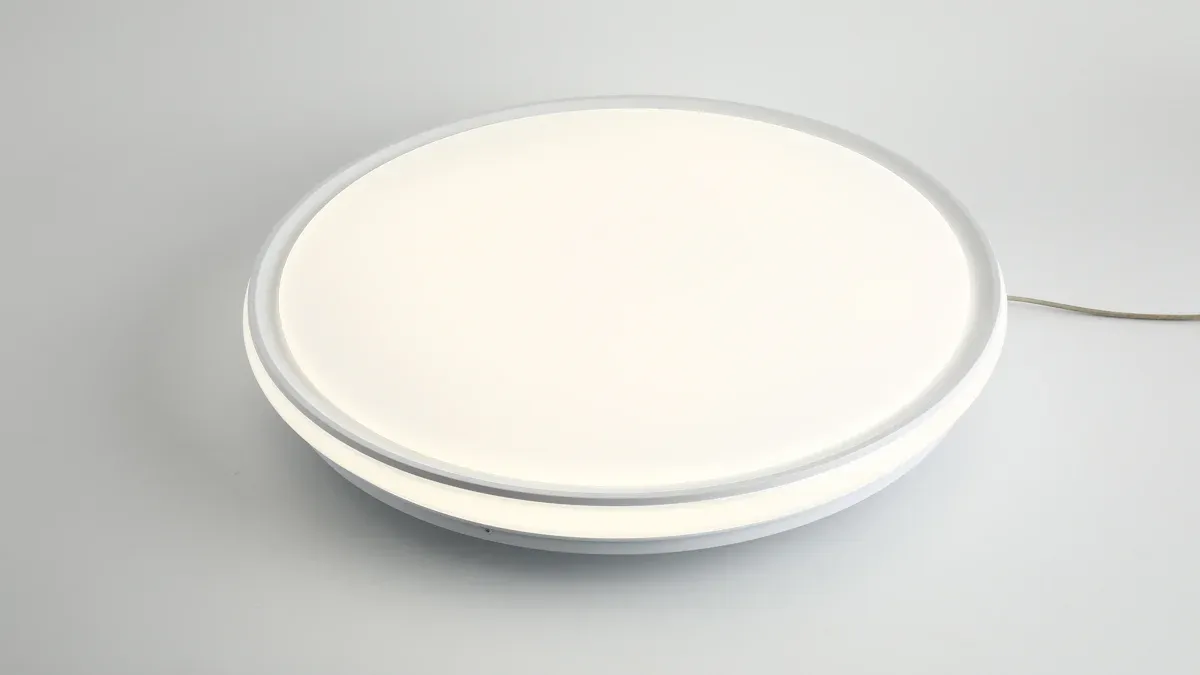
When you test led lights by visual inspection, you identify many common problems before using any tools. This process helps you spot issues early and avoid unnecessary repairs or replacements. You should always start with a thorough look at your led panel light.
Check for Damage
Begin by examining the surface and frame of your frameless led panel light. Look for cracks, dents, or any visible damage. Persistent flickering or a partial outage often signals deeper electrical problems. If you notice any broken sections or loose panels, you should consider professional inspection.
Tip: Flickering that does not stop after basic troubleshooting usually means a serious electrical issue.
Inspect Wiring and Connectors
Next, focus on the wiring and connectors. Poorly set up connections often cause malfunctions in residential settings. Exposed or loose wires can lead to short-circuits and even complete failure of your flat led lights for ceiling. Improper installation may result in recurrent breakdowns.
- Check for frayed wires.
- Make sure connectors fit tightly.
- Avoid leaving any wires exposed.
The table below shows the most frequently reported issues found during visual inspections:
|
Issue Type |
Description |
|---|---|
|
Light Quality and Performance |
Problems include inefficient light emission, excessive brightness, low color rendering index, and flickering lights. |
|
Loose Electrical Connections |
Can cause buzzing, flickering, and complete failure of lights due to poor connections. |
|
Voltage Drop |
Affects performance, leading to flickering and inadequate brightness when too many fixtures are daisy-chained. |
|
Incorrect Color Display |
RGB LED strips may show incorrect colors due to voltage drop or poor wiring. |
|
Installation Errors |
Poor installation can lead to various issues, including flickering and dimming lights. |
|
Panel Overloads |
Caused by power surges or incorrect fuse ratings, leading to potential damage to LED lights. |
Look for Burn Marks
- Scan the panel and connectors for burn marks or discoloration. These marks often indicate overheating or electrical faults. If you see any blackened spots, you should disconnect the power and seek expert help.
- Burn marks signal a risk of fire or permanent damage. Never ignore them during your test led lights by visual inspection.
- By following these steps, you protect your home and extend the life of your led frame panel light. Regular inspections help you maintain safe, efficient lighting and avoid costly repairs.
Check LED Panel Light Power

Testing the power supply is a crucial step in learning how to test led light. You ensure your LED panel light receives the correct voltage and functions reliably. Power issues often cause flickering, dimness, or complete failure.
Verify Power Source
Start by checking the power supply voltage. Most LED panel lights operate on either 12V DC or 24V DC. You can use a voltage tester or multimeter to measure the output from your power source. If the voltage falls outside the standard range, you may notice flickering, overheating, or early failure of your LEDs.
Standard voltage range: 12V DC or 24V DC
Incorrect voltage can cause:
- Flickering
- Overheating
- Premature failure
|
Power Source Type |
Typical Voltage |
Common Issues if Incorrect |
|---|---|---|
|
DC Adapter |
12V or 24V |
Flickering, overheating |
|
AC Mains |
110V/220V (requires driver) |
Damage, no light |
Tip: Always match your power supply to the specifications listed on your LED panel light label.
Inspect led instrument panel lights Driver
The ultra thin led panel light driver regulates voltage and current for your light. You should inspect it for physical signs of damage. Look for burn marks, swelling, or unusual odors. These signs often indicate a failing driver. Common symptoms include sudden changes in brightness, flickering at startup, inconsistent output, or buzzing sounds.
- Sudden brightness changes
- Flickering or inconsistent illumination
- Audible buzzing from the driver
If you notice any of these problems, replace the driver promptly. Reliable drivers extend the lifespan of your lighting system.
Confirm Secure Connections
- Secure connections are essential for safe and efficient operation. You should check all wiring and connectors for tightness and proper installation. The soldered wire method provides the most reliable connection for permanent setups. Waterproof connectors protect outdoor installations from moisture. Right-angle and flexible connectors help in complex scenarios.
- Adhering to electrical codes ensures safety and compliance. Use high-quality materials to reduce maintenance and prevent frequent failures. Proper wiring, grounding, and circuit protection are critical for hazard prevention.
Note: Loose connections often cause flickering or inconsistent illumination. Always double-check your work before restoring power.
Learning how to test led light power helps you avoid unnecessary replacements and ensures your LED panel light works efficiently. Regular checks improve reliability and safety in your home.
Test LED Light Without a Multimeter
You may not always have a multimeter available when you need to test led light without a multimeter. Fortunately, you can use several practical methods to diagnose issues with your led panel light. These approaches save time and money, making them ideal for homeowners who want quick results.
Swap with Working slim panel light
- Swapping your current panel with a known working one helps you isolate the problem. If the replacement panel lights up, you know the issue lies with the original panel. If neither panel works, the fault may be in the wiring or power supply. This method works well in homes with multiple identical fixtures. You can quickly determine if you need to replace the panel or investigate further.
- You identify compatibility problems between LED lights and dimmer switches.
- You avoid unnecessary purchases by confirming the source of the issue.
- You increase your success rate, as most users report reliable results with this method.
Tip: Always use a panel with the same voltage and specifications to ensure accurate testing.
Check with Different Switch
Testing your led panel light with a different switch can reveal hidden problems. Sometimes, the switch itself causes flickering, buzzing, or complete failure. You can connect the panel to another switch or circuit to see if the issue persists. If the light works with a new switch, you should consider replacing the old one, especially if it is not designed for LED compatibility.
- You discover if the original switch is faulty.
- You prevent future issues by ensuring compatibility between switches and LED panels.
- You save on repair costs by addressing the real problem.
Note: Experts recommend checking compatibility between LED lights and dimmer switches to avoid flickering or buzzing. Consider replacing the switch with one designed for LED lights if problems continue.
Alternative Methods for Testing LED Panel Lights Without a Multimeter:
- Visual inspection for physical damage or poor construction.
- Swapping bulbs to confirm fixture or bulb issues.
- Using a battery to check if the LED lights up.
These methods offer a high success rate for basic troubleshooting. Homeowners find them reliable and cost-effective, especially when professional tools are unavailable. You gain peace of mind and avoid unnecessary expenses by using these simple techniques.
Using a Multimeter to Test LED Panel Light
Testing your LED panel light with a multimeter gives you precise results and helps you diagnose issues quickly. You gain confidence in your troubleshooting skills and avoid unnecessary replacements. You can follow a systematic approach to check the panel, the LEDs, and the driver. This method is reliable and recommended by electrical professionals.
Diode Test Function
You can use the diode test function on your multimeter to check individual LEDs within the panel. This feature helps you determine if the LED is healthy or defective. Follow these steps to test an led bulb with a multimeter:
- Set your multimeter to the diode test mode.
- Connect the black probe to the COM port and the red probe to the V or diode port.
- Identify the anode (longer lead) and cathode (shorter lead) of the LED.
- Touch the red probe to the anode and the black probe to the cathode.
- Observe the voltage reading on the multimeter screen.
- Interpret the results: a voltage drop within the expected range means the LED is working.
If the LED glows during the test, it confirms proper function. If it does not glow or shows no voltage drop, you should replace the LED.
You should always disconnect the LED from the circuit and power supply before testing. In forward bias, the LED should glow and show a voltage drop. In reverse bias, the LED should not glow, confirming it acts as an open switch.
Typical Voltage Ranges for LED Colors
You can compare your readings to standard values. The table below shows healthy voltage ranges for different LED colors:
|
LED Color |
Voltage Range (Volts) |
|---|---|
|
Red |
1.8 - 2.1 |
|
Amber |
2.0 - 2.2 |
|
Orange |
1.9 - 2.2 |
|
Yellow |
1.9 - 2.2 |
|
Green |
2.0 - 3.1 |
|
Blue |
3.0 - 3.7 |
|
White |
3.0 - 3.4 |
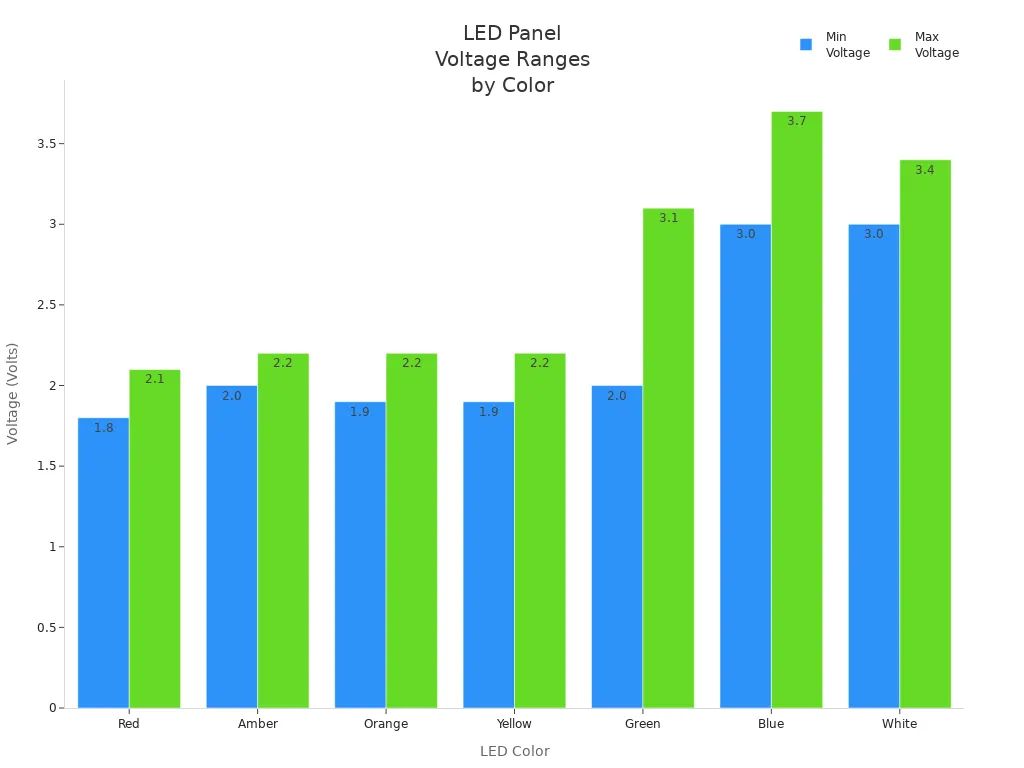
You should use these values as a reference when you learn how to test led light. If your readings fall outside these ranges, the LED may be faulty.
Measure Voltage Output
You can measure the voltage output of your LED panel light to ensure it receives stable power. This step is essential when you want to know how to test led light for performance issues. Use your multimeter to check the voltage at the panel terminals.
- Set your multimeter to the DC voltage mode.
- Place the probes on the panel's input terminals.
- Read the voltage displayed on the screen.
A healthy LED panel light should show a voltage that matches the manufacturer's specifications, usually 12V or 24V DC. If you see fluctuations or a significant discrepancy, you may have a faulty driver or unstable power supply.
Consistent voltage readings indicate a healthy panel. Fluctuating or low readings suggest you need to inspect the driver or connections.
You can also test an led bulb with a multimeter by checking the voltage drop across the bulb terminals. This method helps you confirm if the bulb is receiving the correct voltage.
Test LED Panel Driver
The LED panel driver regulates voltage and current for your light. You can use your multimeter to test the driver and identify faulty components. Follow these steps to learn how to test led light driver:
- Power off the LED panel and carefully disassemble it.
- Inspect the driver for visible damage, such as burnt components or loose connections.
- Use your multimeter to measure the output voltage from the driver.
- Compare the measured output to the expected voltage (12V or 24V DC).
If you find faulty components, replace them with suitable replacements that match the original specifications.
Reassemble the panel and test it to confirm the repair.
If you notice voltage fluctuations or a large difference between the measured and expected output, the driver may not supply stable power. You should replace the driver to restore proper function.
You can prevent future issues by using high-quality drivers and following manufacturer guidelines. Regular testing helps you maintain reliable lighting and avoid costly repairs.
Healthy vs. Faulty Panel Comparison
You can use the following checklist to compare results:
- Healthy panel: Stable voltage output, LEDs glow in diode test, no visible damage.
- Faulty panel: Fluctuating voltage, LEDs do not glow, burn marks or swelling on driver.
- You should always refer to authoritative sources and manufacturer standards when you learn how to test led light. This approach ensures safety and accuracy in your diagnostics.
By mastering how to test led light with a multimeter, you save money, extend the life of your lighting, and enjoy consistent performance in your home.
Fixing LED Panel Lights
You encounter several common issues when working on fixing led panel lights. Flickering, dimness, and complete failure often frustrate homeowners. You can address these problems by learning how to test led light and applying proven repair techniques. You save money and extend the life of your lighting by choosing repair over replacement.
Address Flickering or Dimness
Flickering or dimness signals underlying problems in your LED panel light. You often see these issues when connections loosen or the driver fails. You should start by learning how to test a panel lamp for voltage stability and brightness consistency. If you notice frequent flickering, check for overloaded circuits or incompatible switches. Dimness usually points to a weak power supply or aging LEDs.
Tip: You improve light quality and avoid unnecessary purchases by fixing led flat panel light fixture instead of replacing it.
Repair Loose Connections
Loose connections remain a leading cause of malfunction in the best led panels lights. You can repair these issues by following a certified electrician recommendations. The table below shows effective solutions for different causes:
|
Cause of Loose Connections |
Recommended Solution |
|---|---|
|
Backstab connections |
Avoid backstab connections; use screw terminals. |
|
Screws tightened too loosely |
Use a torque wrench for proper tightening. |
|
Limp-wristed tightening of wire nuts |
Tighten wire nuts securely, not just taped down. |
|
Wire corroding from harsh environments |
Inspect and replace corroded wires regularly. |
|
Heat-related issues |
Repair any heat damage to fixtures and wiring. |
|
Vibration |
Secure fixtures to minimize vibration. |
You should always test led light connections after repair to confirm stability. You prevent flickering and ensure safe operation by securing all wires and terminals.
Replace Faulty LED Panel Driver
A faulty driver often causes your flat panel led ceiling light to fail completely. You can learn how to test led light drivers using a multimeter. If you find voltage fluctuations or visible damage, you should replace the driver. You increase reliability and brightness by installing a compatible, high-quality driver.
Note: You should seek professional help if you notice burning smells, scorched marks, hot panel surfaces, buzzing noises, or outdated electrical panels. These warning signs indicate serious risks that require expert attention.
Common DIY Mistakes
You avoid costly errors by understanding frequent mistakes made during repair:
- Not connecting the fixture to its power source correctly.
- Loose connections causing flickering or failure.
- Using the wrong driver for the fixture.
- Poor wiring resulting in insufficient electricity flow.
- Daisy-chaining too many LED strips together.
You maximize the value of fixing led panel lights by following best practices and learning how to test led light before making repairs. You enjoy safer, brighter, and longer-lasting lighting in your home.
You improve safety and save money by following a step-by-step approach to checking and fixing your slim panel light. Regular inspections help you catch issues early, extend the lifespan, and boost energy efficiency.
- A high-quality LED fixture with advanced materials produces more light per watt, minimizes heat, and lasts longer.
- Monthly checks ensure reliable performance.
- Annual inspections reduce maintenance costs.
- Repairing instead of replacing supports sustainability.
|
Maintenance Condition |
Average Lifespan (hours) |
|---|---|
|
Properly Maintained |
50,000 to 100,000 |
|
Neglected |
Dramatically Reduced |
Why does my LED panel light flicker?
+
-
Flickering often happens because of loose connections, incompatible dimmer switches, or a failing driver. You can fix this by tightening wires, replacing the switch, or installing a new driver. Reliable lighting improves comfort and reduces eye strain.
Why should you test LED panel lights before replacing them?
+
-
Testing helps you find the real problem. You avoid unnecessary replacements and save money. You also prevent electrical hazards by catching issues early.
Saves time
Reduces costs
Improves safety
Why do LED panel lights fail more quickly in some rooms?
+
-
A multimeter gives you accurate voltage and continuity readings. You can quickly identify faulty drivers, bad connections, or dead LEDs.
Using a multimeter ensures you fix the right problem and maintain safe, efficient lighting.
Why is a multimeter important for LED panel light troubleshooting?
+
-
304 stainless steel meets the international requirements of food grade,316 stainless steel is not only food grade or medical grade. However,the use of this medical grade as a production cup will not bring additional benefits to everyone. Why is it called 304 or 316? This is mainly defined according to the material composition. 316 stainless steel is not similar to mineral materials,after use can release some substances to promote human absorption.
Why do LED panel lights sometimes buzz or make noise?
+
-
Buzzing usually comes from incompatible dimmer switches or a failing driver. You can stop the noise by using LED-compatible dimmers and replacing faulty drivers. Quiet operation means better comfort and higher product quality.
Send Inquiry